
Last verified: August 16, 2026.
This guide compares the current static sticker and emote requirements published by WhatsApp, Telegram, Discord, and Twitch. Animated assets and other custom emoji formats use different rules and are outside this comparison.
The table, checker, and downloadable chart below use the same specification data as PhotoToSticker's platform exports. Platform rules can change, so every row links to the corresponding first-party source.
Verified static sticker and emote requirements
Last verified: 2026-08-16
| Platform | Format | Dimensions | File size | Transparent background | Source |
|---|---|---|---|---|---|
| WebP | Exactly 512 × 512px | ≤ 100 KB | Required | Official source | |
| Telegram | PNG / WebP | One side exactly 512px; other ≤ 512px | ≤ 512 KB | Required | Official source |
| Discord | PNG | Exactly 320 × 320px | ≤ 512 KB | Recommended | Official source |
| Twitch | PNG | Manual: 28 × 28, 56 × 56, or 112 × 112 pixels; auto-resize: square, 112–4096 pixels | Manual: maximum 100 KB; auto-resize: maximum 1 MB | Required | Official source |
Check a sticker before you import it
Use the free checker to inspect a PNG or WebP file against all four platforms. It reads the file format, canvas dimensions, file size, and transparent pixels entirely inside your browser.
Free sticker and emote specification checker
Check a static sticker or emote PNG or WebP against the current WhatsApp, Telegram, Discord, and Twitch requirements.
Your image is checked locally in your browser and is never uploaded.
The result is a requirements check, not platform certification. A platform can still reject an upload because of account permissions, pack composition, content policy, or a later rule change.
For a browser-local single-sticker layout, the Printable Sticker Maker exports a 2048 × 2048 transparent PNG or a print PDF. If your community also needs 28, 56, and 112 pixel chat assets, the Twitch Emote Maker prepares those three Twitch sizes.
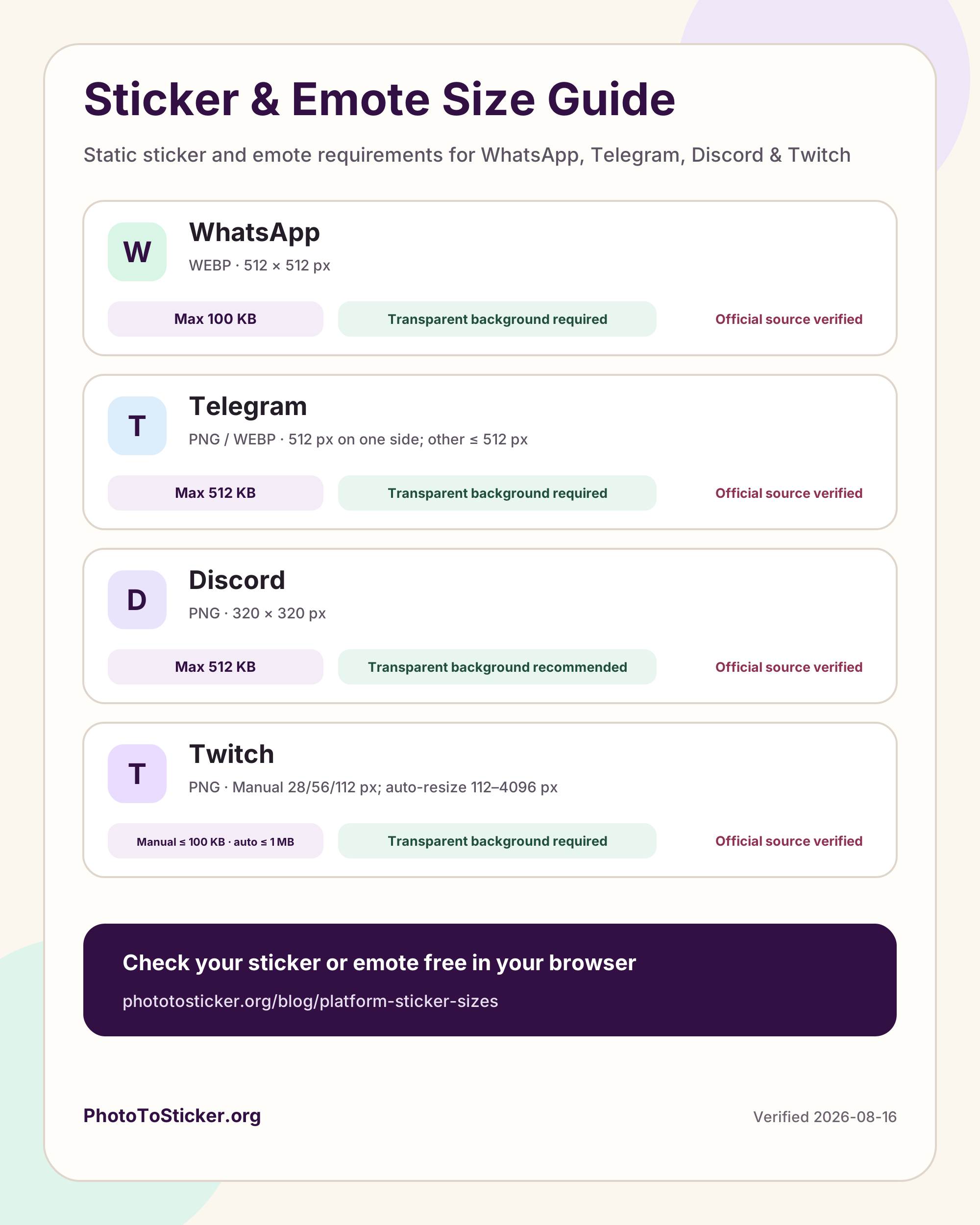
Download the complete specification chart
The chart is available as a high-resolution PNG for documents and social posts, plus an SVG for layouts that need to remain sharp at any size.
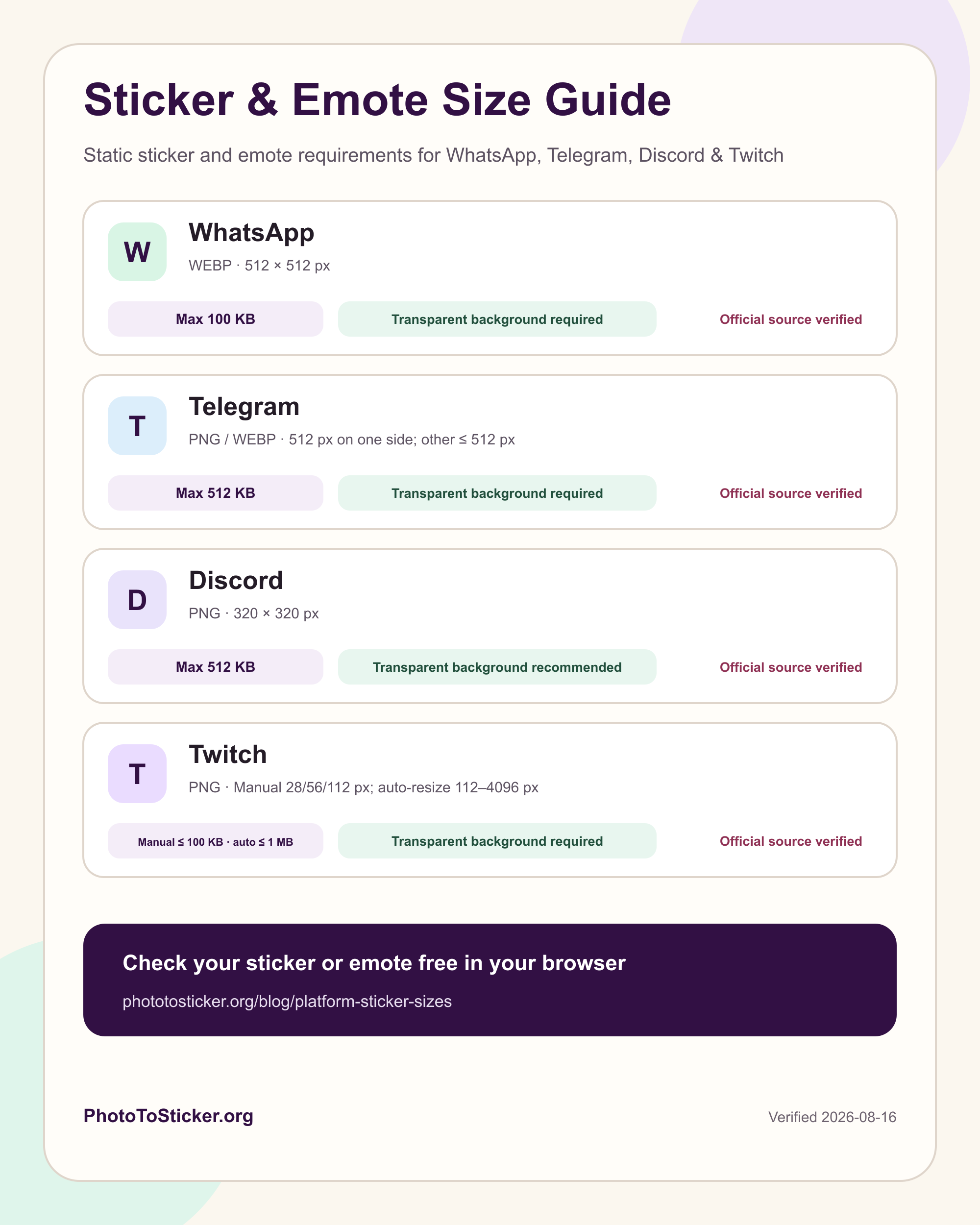
Download the platform image specification chart
Save the high-resolution chart for design notes, tutorials, community guides, or your own sticker and emote workflow.
WhatsApp static sticker requirements
WhatsApp requires static stickers to:
- use the WebP format;
- measure exactly 512 × 512 pixels;
- have a transparent background;
- stay at or below 100 KB per sticker.
WhatsApp recommends testing stickers against light, dark, colored, and patterned backgrounds. Its official sample also recommends an 8px white outer stroke so the subject remains readable in different chats.
WhatsApp organizes stickers into packs. A pack contains 3–30 stickers and must be added explicitly by the user. PhotoToSticker prepares correctly sized WebP files and an import guide; it does not publish a sticker app or install the pack automatically.
Read the official WhatsApp sticker art requirements.
Telegram static sticker import requirements
For a file prepared for Telegram's static sticker import path:
- use static PNG or WebP;
- keep one side at exactly 512 pixels and the other at 512 pixels or less;
- stay at or below 512 KB;
- include a transparent layer.
Telegram's sticker creation overview offers broader design guidance, while the SDK import documentation states the hard requirements for files supplied to an importing app. PhotoToSticker produces downloadable import files, so its table, checker, and PNG encoder use the import profile rather than the softer overview wording.
Users can publish prepared PNG or WebP files with Telegram's @Stickers mini app. Telegram also provides a built-in editor for creating stickers directly in a chat.
Discord static sticker requirements
Discord's server stickers are different from small custom emoji. A static Discord sticker must:
- use PNG;
- measure exactly 320 × 320 pixels;
- stay at or below 512 KB.
Discord recommends transparency and asks uploaders to choose a related Unicode emoji. That emoji helps the sticker appear in suggestions and search.
On desktop or web, a server owner or member with Create Expressions permission can open Server Settings → Stickers → Upload Sticker, choose the PNG, name it, select a related emoji, and add an optional accessibility description.
Read Discord's official sticker creator requirements.
Twitch static emote requirements
For Twitch's manual-size static emote path, prepare three square PNG files:
- 28 × 28 pixels;
- 56 × 56 pixels;
- 112 × 112 pixels;
- no more than 100 KB per manual-size file;
- a transparent background.
Twitch also documents an automatic-resize path for one square PNG from 112 × 112 through 4096 × 4096 pixels, with a maximum file size of 1 MB. PhotoToSticker's Twitch-specific archive uses the three explicit manual sizes so you can inspect each result before uploading it yourself.
Read the official Twitch Subscriber Emote Guide.
Why transparent backgrounds matter
A sticker appears on many chat surfaces. Solid rectangles can look like pasted photos, while a clean alpha edge lets the subject sit naturally beside a message. Transparency is a hard WhatsApp, Telegram import, and Twitch requirement. Discord recommends it.
After background removal, check hair, hands, pet fur, and the space inside arms or accessories. Pale leftover pixels are easiest to spot by previewing the sticker on both a dark and light background.
Use one clean master for every platform
Keep one larger transparent master, then create each platform copy from that master. Do not repeatedly resize an already reduced file: repeated scaling softens outlines and facial details.
PhotoToSticker currently exports:
- 512 × 512 WebP for WhatsApp, with size-aware compression;
- 512 × 512 PNG for Telegram, with a transparent layer and a 512 KB limit;
- 320 × 320 PNG for Discord;
- 28 × 28, 56 × 56, and 112 × 112 PNG for the Twitch-specific workflow.
WhatsApp, Telegram, and Discord ZIPs retain one numbered file per successful reaction. The Twitch ZIP keeps one numbered PNG in each of the 28 × 28, 56 × 56, and 112 × 112 folders for every successful reaction. Every archive also includes the import guide for its selected workflow.
Frequently asked questions
Is 512 × 512 a universal sticker size?
No. WhatsApp requires an exact 512 × 512 square, while Telegram requires only one side to be exactly 512 pixels. Discord server stickers use an exact 320 × 320 square. Twitch's manual-size static emote path uses 28 × 28, 56 × 56, and 112 × 112 PNG files.
Does the checker upload my image?
No. The checker decodes and reads pixels in your browser. It does not send the file, filename, or image content to PhotoToSticker's servers.
Why do Telegram's official pages use different wording?
The sticker creation overview explains design and publishing choices, while the SDK import page defines the format, dimensions, 512 KB limit, and transparent layer required for files passed through an importing app. Because PhotoToSticker prepares those import files, the checker follows the SDK import requirements.
Does a passing result guarantee the platform will accept my sticker?
No. Passing means the file meets the requirements the checker can verify. Permissions, pack size, related emoji, content rules, and future platform changes can still affect an upload.